
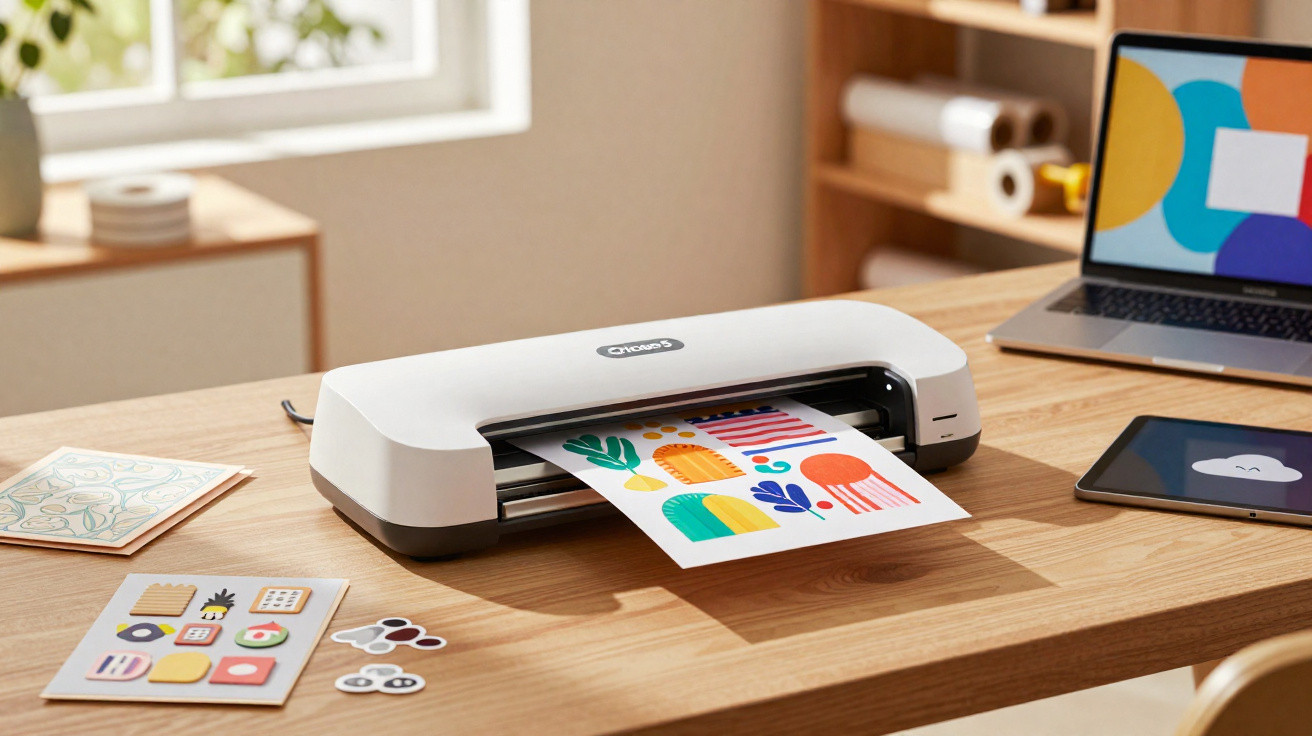
Cricut is 20 years old! The global leader in creative crafting is doing far more than simply blowing out its candles: it is using the occasion to unveil the Cricut Explore 5, an updated version of its flagship creative cutting machine.
By redesigning the device from the ground up, Cricut aims to show that a compact format need not come at the expense of performance. Its notably unusual open-top design and extensive artificial intelligence integration immediately caught our attention. We therefore spent several weekends creating, cutting and discovering the ins and outs of this rather distinctive machine.
Reduced footprint
Taking the Explore 5 out of its box, the visual change is immediately striking. The machine takes up 30% less space than the Explore 4. That is a worthwhile engineering achievement, especially for anyone with limited room to accommodate another object in an already crowded flat. With a chassis width of 50.2 cm, it can slip neatly between a 4K television and a smart speaker.
The Explore 5 has a very clean open-top look, leaving its mechanism and guide rails visible. This bold approach makes it feel more like an industrial precision tool than a small household appliance. Yet, contrary to what this slimming-down might suggest, practicality has not been sacrificed. Although the top of the machine is now uncovered, Cricut has retained its key strengths.
Its front panel folds down horizontally to allow the cutting mat through and still incorporates storage compartments. There are dedicated spaces for spare blades, weeding tools and pen tips. Everything remains within easy reach, then disappears into the thickness of the front flap once the machine is open. However, users will have to accept that the upper rail is constantly exposed to household dust, meaning it will need wiping down more regularly than models fitted with a cover.
Upgraded technology
The Explore 5’s main technical development is found in its tool holder. It still has two clamps, A and B, for the tools: clamp A is for drawing instruments, while clamp B holds cutting tools. The first no longer has the small toggle latch that previously needed to be manually closed, sometimes with uncertain force.
The Explore 5 introduces a direct-insertion fastening system called “Snap-In”. Simply slide in the pen until it “clicks”, and the machine confirms that everything is in place. It is convenient, dependable and considerably more pleasant for complex projects requiring several colours. Clamp B uses the familiar Premium Fine-Point blades, providing welcome continuity for regular users who already have a supply of spare blades.
The Explore 5 does not extend the range’s physical cutting limits. It remains able to handle materials up to 1.5 mm thick using the Deep-Point Blade, just as the Explore 3 and Explore 4 could. The real achievement is not doing more, but matching that performance in a body that is 30% smaller.
Magnets, stickers and greeting cards
We did not encounter any major difficulties during testing. Cutting a magnetic sheet to make fridge magnets or correspondence cards was effortless. We also appreciated the straightforward “Print Then Cut” feature, which lets you print a sheet using a home inkjet printer before cutting it out. It works by using optical registration marks added during the editing process.
The Explore 5 remains the undisputed queen of vinyl, paper and mid-range materials. Unsurprisingly, it retains compatibility with Cricut Smart Materials, which do not require a cutting mat. Projects can then reach up to 3.6 metres in length. The stepper motor appears to have been redesigned, as it is noticeably quieter and produces fewer vibrations.
In a way, the Explore is moving onto the territory of the Maker, Cricut’s premium cutting machine. Can it replace it? Not really: the Maker stands apart through its Adaptive Tool System. This high-power geared system in the carriage can operate a rotary blade that is ideal for fabric, as well as a highly effective knife tool for tackling balsa wood and basswood up to 2.4 mm thick.
Another major difference is that the Maker delivers 4 kg of cutting pressure, while the Explore 5 still tops out at roughly 400 g. If you intend to carve solid wood or engrave metal, the Maker remains the only option. For everything else - 95% of DIY uses - the Explore 5 is, in our view, the benchmark and offers the best power-to-footprint ratio.
Design Space becomes smarter
Cricut’s in-house Design Space app serves as the machine’s creation and control centre. Available on Windows, macOS, iOS and Android, it connects wirelessly to the Explore 5 over Bluetooth, although a USB-C cable is also included. The 2026 version of the app stands out for its AI integration throughout, particularly through “Create with AI”, which makes it possible to create complex projects. You can now simply enter a prompt to generate intricate cutting files.
For instance, type “create a vintage sticker set for a bicycle repair workshop” and the AI will offer a sheet ready to print and cut. Better still, it optimises the paths for the best outcome, such as gently rounding excessively sharp corners that could tear the paper or obstruct the tip. The time saving can be enormous, since there is no need to go through a design stage in professional software.
AI also appears in “smart positioning”. The shape of every item to be cut is analysed, allowing them to be nested as closely together as possible on the virtual mat. This reduces material waste. On a project involving around 20 stickers, it can save up to 20% of raw material. That is far from insignificant, particularly when buying Cricut supplies at full price.
The smart background remover is another positive point. It lets you photograph a real object with your smartphone and remove its background in a second, creating a cut-out sticker. The experience is smooth and easy to understand, genuinely encouraging experimentation without the fear of technical failure.
Cloud convenience and Cricut Access
One of Design Space’s strengths is its cross-platform availability. You can, for example, begin a project on a tablet or smartphone while travelling, then refine it on a larger display using the macOS or Windows versions. Creations are kept in the Cricut Cloud, providing immediate synchronisation without the need to manage any file transfers.
In short, everything would be ideal were it not for one frustrating detail. To access every Design Space feature, a Cricut Access subscription is required (£9.99 per month or £99.99 per year). It is essential for AI-related functions, including image generation, and for access to most of the customisable projects offered in the app. Naturally, everything is arranged to encourage users to take out the subscription, starting with one free month when the machine is purchased.
For regular use, the subscription is worthwhile: it provides templates, ready-made projects that can be personalised, and discounts on consumables. That said, the machine remains perfectly usable without a subscription. You will simply have to make do with a limited number of customisable templates, create your own projects from scratch and import your own images.
It is also disappointing that Cricut’s solution remains closed, with the company choosing not to provide a driver for connecting the device to third-party cutting applications used by some experienced makers. A shame.
Cricut Joy 2: the entry-level model steps up
Cricut also took the opportunity to send us the Joy 2, its entry-level cutting machine, updated at the same time as the Explore 5. We could not resist trying it out: here is what we think.
The Cricut Joy 2 is more than a simple cosmetic refresh. It retains the previous model’s lightweight format of under one kilogram, making it easy to store in a drawer or slip into a travel bag, and it finally gains the “Print Then Cut” function. Already available on the other ranges, it brings particularly welcome convenience to its use. To achieve this, Cricut had to completely rethink its tiny chassis to fit in a high-resolution optical sensor.
The Joy 2 finally becomes the ultimate sticker machine. It should appeal to younger creators who do not want a bulky product simply to make stickers. Travellers may regret the lack of a rechargeable battery, as the power supply remains essential. Perhaps for a future version?
Although its cutting width is limited to 11.4 cm, whereas the Explore 5 supports full A4, it is ideal for home organisation or personalising notebooks. It uses its own ecosystem of blades and pens, which are shorter than those used by the Explore, but benefits from the full power of Design Space AI. Sold from £120, it is the ideal companion for anyone who wants to create without being burdened by imposing equipment.
Our verdict on the Cricut Explore 5
The Explore 5 is arguably the most balanced machine Cricut has ever made. By reducing its footprint by 30% and adopting a highly contemporary open design, it finally fits the constraints of city flats. It does not revolutionise the field, but it improves it through a series of welcome refinements. By keeping storage in the front panel rather than placing it under a bulky cover, it gains style without losing any practicality.
Design Space, Cricut’s control app, has evolved in a relevant way. We welcome the use of AI to speed up the creative process, as well as the availability of customisable projects. To make the most of it, though, a subscription is needed. We would have liked the manufacturer to provide software drivers allowing the machine to work with other cutting apps. Evidently, however, that is not Cricut’s vision: it wants to offer an easy-to-use, all-in-one solution.
And what about the price? The Explore 5 is available from £250 with the bare essentials: tools, a cutting mat, a black marker and a few material samples to get started. Given its capabilities, that seems fair for anyone looking to discover the simple pleasures of creative crafting. Consumables must be added to the cost, and the bill can quickly rise. It is through these - and the subscription - that Cricut can maintain comfortable margins.
If you already own an Explore 3 or 4, moving to version 5 is not really essential unless you are desperately short of space. But for anyone looking for their first “proper” cutting machine, the Explore 5 offers the market’s best power-to-footprint ratio. Cricut proves that, at 20 years old, it can still slim down without losing an ounce of effectiveness.
Cricut Explore 5
£250
Overall score
9.0/10
What we like
- The compact format
- AI integration
- A successful Design Space app
- Tool storage in the fold-down front panel
What we like less
- The open design leaves the mechanism exposed to dust
- No major changes compared with the Explore 4
- A subscription is almost essential for regular use
See the Cricut Explore 5




Comments
No comments yet. Be the first to comment!
Leave a Comment