
Your Wi‑Fi was working perfectly yesterday-perhaps even at full tilt-yet today it is moving as though it is slogging through treacle. Most of us immediately point the finger at the broadband provider, perhaps grumbling about “the line” or “the storm last week”. We restart the router, watch its tiny lights as though they are critical medical monitors, and wait for a miracle.
At times, the broadband connection genuinely is to blame. More often, though, the culprit is sitting in the centre of your living room: the plastic box with its rather moody-looking aerials. Its position, the objects around it and whether it is high or low can all determine whether you enjoy sharp 4K streaming or endless buffering circles. One straightforward but frequently ignored positioning error can cut your speed in half, and there is a good chance it is happening in your home now.
The day the Wi‑Fi died (and came back from under the TV)
I have heard one particular story in countless forms: “The Wi‑Fi used to be fine, then we moved the TV.” One Birmingham family told me their internet had “suddenly gone bad”. Streaming became unusable, the children’s games started lagging, and their dad was angrily comparing mesh systems at 11pm. Their broadband provider tested the connection, reset equipment remotely and declared the line “perfect”. It appeared that the house itself was the problem.
Finding the router during my visit took no effort. It had been squeezed behind a glossy 55-inch television, inside a cabinet packed with a sound bar, a Sky box and what seemed to be a forgotten DVD player. The cabinet doors were normally shut “to keep it tidy”. The enclosed space was warm, slightly stale and filled with the low electronic hum and dust of neglected equipment. That supposedly “perfect line” was being choked.
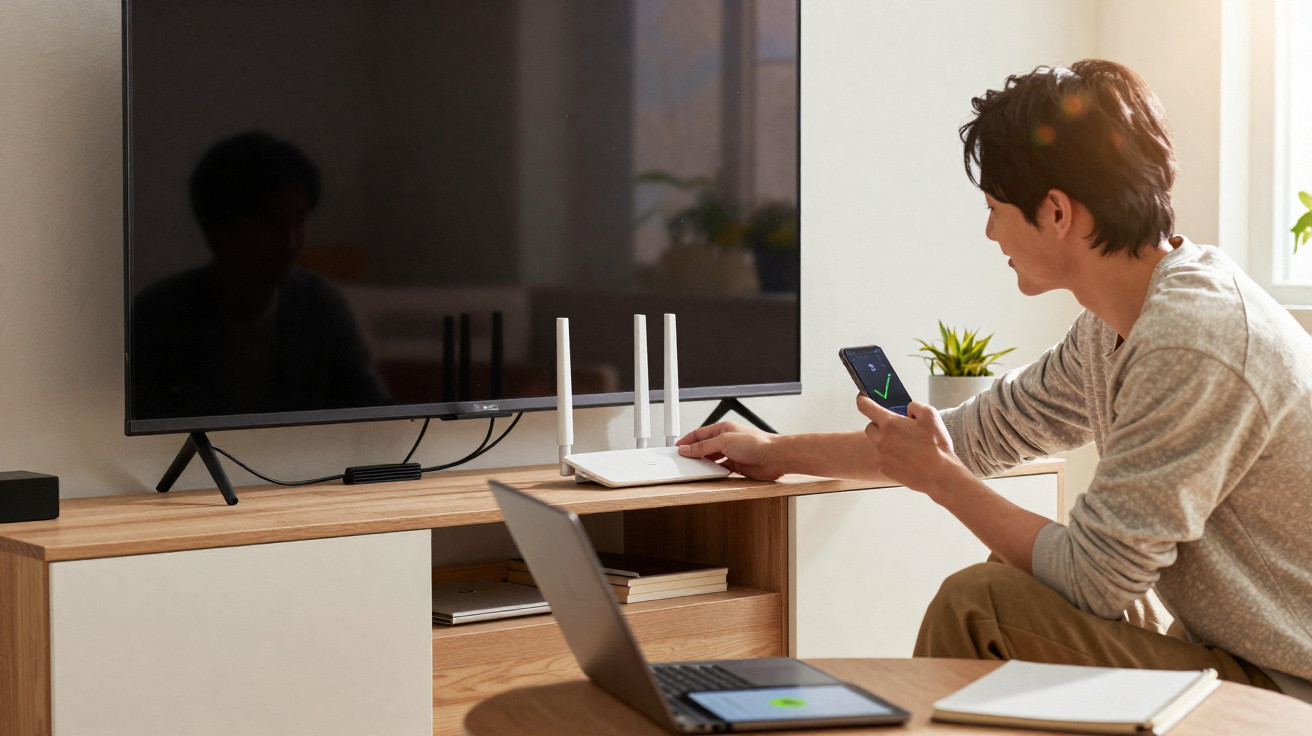
We removed the router, stood it upright on the cabinet, left room around it and shifted it slightly away from the television. I then asked the family to test the speed on a phone from their usual place on the sofa. Within ten seconds, the download speed had almost doubled. The broadband service had not changed at all; only the signal’s ability to travel through the room had.
The invisible fog you’re trying to push through walls
Wi‑Fi is not magic, even if it can seem that way when everything works well. It is simply radio waves operating at higher frequencies. Picture those waves as an invisible fog moving through your home: occupying rooms, rebounding from surfaces and passing around corners. If the router is shut in a cupboard, placed on the floor or concealed behind a television, that fog has little opportunity to spread. It encounters brick, metal, glass and electrical wiring before it has even left “home base”.
Certain materials are relatively mild obstacles. Plasterboard weakens a signal slightly, while wooden doors take away a little more. The more serious barriers include brickwork, concrete, mirrored wardrobes, fish tanks and large metal appliances such as fridges. Every one of them removes further signal strength. Put your router beside, or behind, several of these obstacles and you are effectively asking Wi‑Fi to project through a stack of winter coats.
Realistically, very few people consider any of this when the router is first connected. The engineer says, “It needs a socket and the broadband line”, which commonly places it in a hallway corner or behind the television where the fibre enters the property. Those of us who prefer a tidy home then make the classic mistake: we conceal it. We place it low down, close it into a unit or tuck it out of view. It may look better, but the signal is already struggling before it reaches the door.
The single biggest Wi‑Fi router mistake: low, hidden, and smothered
Why floor-level Wi‑Fi is killing your speed
The most common pattern is routers positioned on the floor or locked inside closed furniture. In either case, they begin at a disadvantage, like runners starting with their shoelaces tied. Radio waves spread most effectively when they have elevation and open space, which is why coverage improves when a router sits around chest height or above in the open. At floor level, the signal almost instantly collides with furniture, rugs, radiators and the everyday clutter of a home.
Consider a typical UK living room. There may be a low television unit filled with consoles and set-top boxes. The router is placed inside because the cable emerges from the wall behind the unit. Once the cabinet doors close with a quiet click, Wi‑Fi performance can fall by 30, 40, sometimes 60 percent. There is no dramatic failure-only a steady build-up of irritation whenever you try to download something.
One network engineer I spoke with said he barely needs to run a speed test during home visits now. He enters, spots a router on the carpet behind a sofa and already knows what the figures will show. “It’s like asking the signal to crawl out from under the furniture and then run a marathon,” he laughed. Fixing it does not require a qualification in radio physics; it simply requires accepting that the unattractive little box needs to remain visible.
Why your TV is secretly bullying your router
Your television may look harmless, but large screens are made up of metal, electronics and glass-all materials Wi‑Fi signals struggle to pass through. When a router is placed immediately behind a large screen, particularly one fixed to the wall, its signal can effectively fire straight into a barrier of interference. The rest of the room receives only a weaker, uneven version of what the router could otherwise deliver.
I have seen the same result in speed tests too many times to count. With the router behind the TV, the sofa might receive 40 Mbps if you are fortunate. Move that identical router 40 centimetres sideways and raise it up, with the same broadband line, and the figure can reach 80–90 Mbps. The change is simply that the radio waves are no longer being hit by a huge illuminated rectangle. You have not upgraded your package or bought a mesh kit; you have just stopped placing your Wi‑Fi behind a barrier.
We’ve all had that moment when we blame “the internet” as if it’s some distant, moody creature, when the real saboteur is the way we’ve trapped it behind our own stuff. It can be slightly embarrassing to recognise this, but it is also immensely satisfying. After all, it often means that a “slow connection” can be resolved in the time needed to move a cable and dust a shelf.
The simple placement fix that gives you your speed back
The golden rule: centre, height, and air
The strongest Wi‑Fi placement advice comes down to one simple image: think of the router as a small radio lighthouse. It needs a position from which its signal can reach in every direction, rather than being buried in a cupboard at the back, facing a wall. Ideally, this means locating it roughly in the middle of your home, or at least away from solid exterior walls and dense household clutter.
Height is especially important. Place the router on a shelf at approximately chest height, or a little above, and the signal can travel over furniture instead of having to pass through it. Leave some clear space around every side: avoid metal backing, piles of books leaning against it or cables pressed around the aerials. The improvement is often far from minor. Many people are astonished at how much quicker their connection seems after something as apparently silly as moving it off the floor.
The space around the router matters as well. The vents on its sides and back serve a purpose; they are not merely decorative. If dust, fabric or the rear panel of a wooden cabinet blocks them, the router may overheat and quietly reduce its own performance. One broadband technician told me about taking a router from a cupboard and finding it “almost hot to the touch, like a forgotten mug of tea”. Once it had cooled down and been left in the open, it performed like an entirely different device.
The three quick moves that actually matter
There is no need to completely redesign your home; a few focused adjustments are enough. First, take the router out from behind the television or any enclosed unit. Where there is enough spare cable, pull it to one side of the TV stand and stand it upright on top, or put it on a nearby floating shelf. If it has aerials, set them vertically like small radio chimneys.
Second, lift it higher. A bookcase, sideboard or even a solid plant stand will do if you are improvising. Try to place it at least 1 metre above the floor, and preferably higher where your main devices-laptops, phones and smart TVs-are used on the same level. Think less “landline phone on a skirting board” and more “small speaker where you’d actually hear it”.
Third, keep it away from other substantial electronic devices. Leaving a couple of feet between the router and your TV, games console or microwave can reduce a surprising amount of interference. It does not need complete isolation; it simply should not have a front-row place among the house’s noisiest electronics.
The strange psychology of hiding the box
Many homes are engaged in a quiet battle between appearance and practicality. Put bluntly, routers are unattractive. They do not suit mid-century sideboards or carefully selected paint colours. As a result, people hide them behind photographs, beneath radiators, inside shoe cupboards-anywhere other than somewhere visible. It may be an interior-design success, but it is a connectivity failure.
One couple told me they had argued for weeks over the router sitting on the hallway table. She wanted it out of sight, while he wanted reliable Wi‑Fi in his office. Eventually, they settled on a wicker basket left partly open, allowing air to circulate and ensuring the signal did not have to force its way through the weave. It was not an ideal answer, but their speeds returned to the level they were paying for. Sometimes the solution is not to hide a router but to disguise it: put a plant nearby or position a frame behind it rather than in front of it.
There is also a persistent assumption that paying for, say, “500 meg” should mean receiving that speed in every room regardless of the router’s location. Perhaps that works on paper. In a three-bedroom Victorian terrace with thick internal walls and a staircase that devours signals, it will not. Router placement is part of the network, not a minor afterthought. Once that becomes clear, moving it feels less like a faff and more like finding the best place in the house for something used every day.
When moving the router isn’t easy
Many properties have an awkward limitation: the broadband line enters at a ridiculous point. It may be in the front hallway by the front door, down in a corner behind the fridge or in an unused upstairs box room. The natural response is to sigh, accept it and tolerate inconsistent coverage. A better approach is to be slightly inventive about the route taken by the cable.
In some cases, this means buying a longer Ethernet cable and running it neatly along the skirting board to a more central position. Cable clips cost very little, while a 10-metre cable can create entirely new placement options. If your provider permits it, you could even ask for the master socket to be moved, although this is rarely offered free of charge. It can still be less expensive than a premium mesh system when the real issue is simply that the router needs to escape its hallway tomb.
Of course, some homes will not receive coverage in every corner even with excellent placement-old stone cottages, long narrow terraces and loft conversions two storeys above, for example. This is where extenders and mesh systems become worthwhile. Yet the main router’s location still establishes the baseline. Put it at a bottleneck and even an expensive mesh system will distribute a compromised signal around the house, much like reproducing a blurred photocopy.
The quiet satisfaction of fixing your own Wi‑Fi
There is something unexpectedly satisfying about checking a speed test, shifting a plastic box by half a metre and seeing the figures jump. You move from feeling controlled by “the internet” to understanding that you are part of the equation. A router is not merely a necessary nuisance; it is a small radio hub shaped by the environment you give it. Change that environment and your digital life changes with it.
The Birmingham family still send me messages occasionally, usually after moving furniture in the living room. “We made sure the router got a prime spot,” the dad wrote most recently, attaching a photo of it sitting proudly on a central shelf. The children have no idea anything has changed. Everything simply works again. The only signs are the router’s faint warmth beneath your fingers, its softly flashing lights and the next episode loading immediately instead of leaving you watching a spinning circle.
Before contacting your provider, buying new equipment or blaming the fibre rollout, take a proper look at where the router is positioned. Is it low down, hidden and smothered by furniture and electronics? Or is it raised up, with a clear path across the home it is supposed to serve? That small rearrangement could be the simplest, least glamorous and most effective upgrade you make this year.





Comments
No comments yet. Be the first to comment!
Leave a Comment